AI album covers that read as photographed artwork
PassReal processes AI-generated album artwork before it reaches a distributor. Generation metadata is stripped, sensor grain is applied at intensity 0.018, lateral chromatic aberration reaches 1.25 px at the corners, the frequency spectrum is smoothed at 0.88 of Nyquist, and camera EXIF is written with a matching JPEG quantization table. A 1200x1200 cover takes about a minute end to end.
Last updated: 2026-08-31
Why cover art gets checked at all
Music distribution sits at an awkward point. A distributor takes a file, pays for its delivery to a dozen stores, and carries the consequence if a store rejects it. Artwork review is where that risk is cheapest to manage, so it is where the checking happens - before the release is queued, not after.
Most of that checking is not a neural classifier. It is a script reading the file. A PNG exported from a generation tool carries text chunks naming the model and often the prompt. Files that pass through Adobe tooling carry XMP. Images produced by services that signed on to content provenance carry a C2PA manifest, which is a cryptographically signed statement that the image was machine-generated. None of that requires anyone to look at the picture.
What a generated cover carries before processing
Open a freshly generated square PNG in an exiftool session and the interesting part is what is present rather than what is missing. There is no camera make, no model, no exposure triple, no lens description - and there is, frequently, a parameters or prompt text chunk holding the full generation string. A reviewer does not need to interpret any of it. The presence of the field is the finding.
The pixels tell a second story, quieter and harder to act on. A diffusion model that generates at one resolution and upsamples to another leaves a periodic residue in the frequency domain, regular in a way that no optical system produces. Corners are as sharp as the centre. There is no sensor noise floor, because there was no sensor. Colour channels align perfectly across the frame, because nothing refracted them.
What the pipeline rewrites
Metadata first: text chunks, XMP blocks and C2PA manifests are removed, so the script-level check finds an ordinary file rather than a declaration.
Then the optical layer. Grain is applied at intensity 0.018 - low enough to stay invisible at viewing size, high enough to give the image a noise floor it did not have. Lateral chromatic aberration is applied radially, reaching 1.25 px of channel separation at the corners and none at the centre, which is how a real lens behaves. A constant shift across the frame, which is easier to implement, is not how any lens behaves.
The frequency stage applies a low-pass filter at 0.88 of the Nyquist frequency, attenuating the periodic upsampling residue without visibly softening the artwork.
Finally the file is written as a JPEG with EXIF describing a specific camera body, and - this is the part that is usually skipped - the quantization table of that body rather than a generic one. A file claiming a Canon body while carrying the standard library table is contradicting itself in a way that a forensic tool reads instantly.
Where this fits in a release workflow
Process the master, not the export. Artwork usually goes from a generation tool to a design pass - lettering, crop, colour grade - and only then to the distributor. Running naturalization before the design pass means the lettering is composited on top of processed pixels and carries none of the treatment, which leaves a frame where the type is statistically cleaner than everything around it. Run it last, on the finished square, and export once.
What it costs
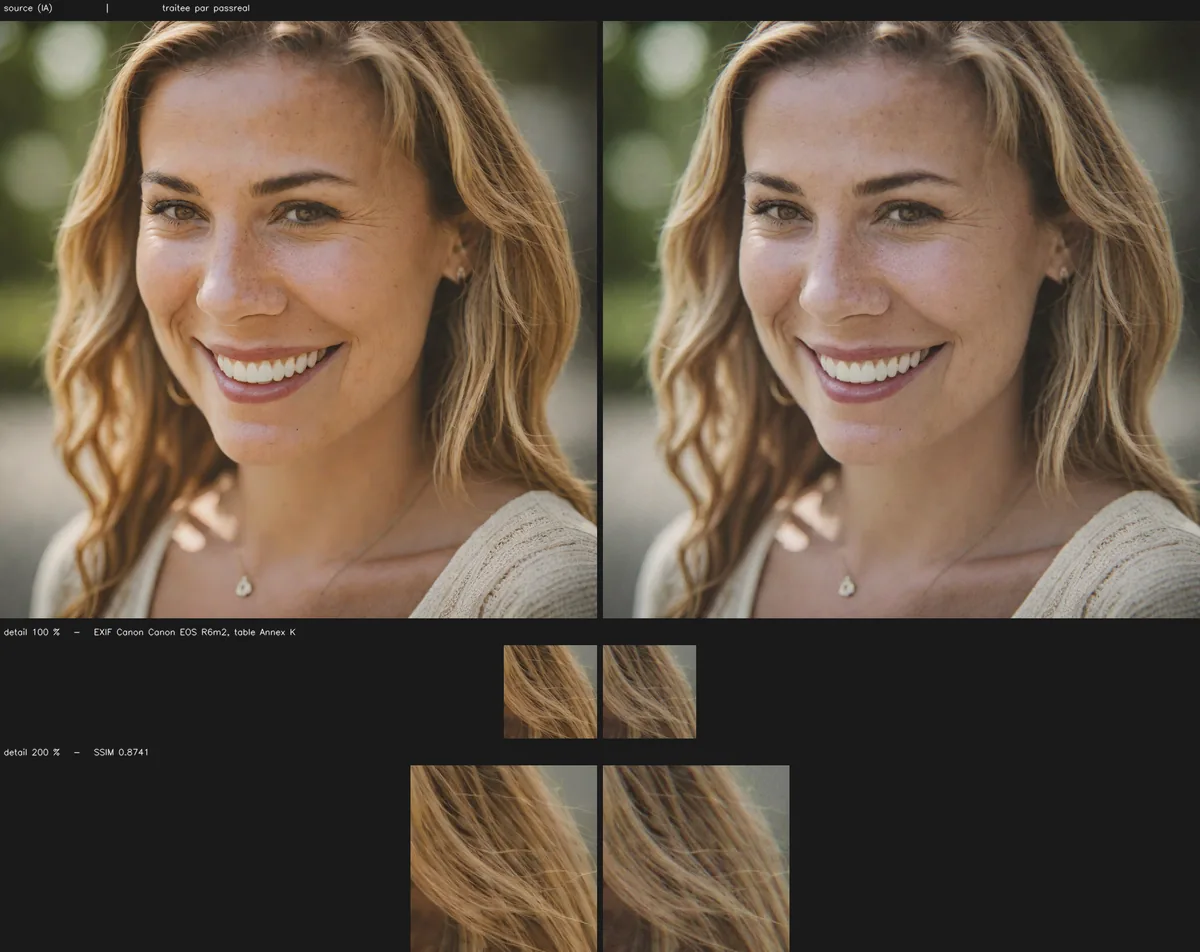
Fidelity is measured on every image, not asserted. The before/after sheet above reports SSIM and PSNR for this exact cover, computed against the source. The figures for other images differ, which is why they are computed per image rather than published as a single number.
The honest boundary: this pipeline changes what a file declares and what its pixel statistics look like. It does not change whether the artwork itself reads as machine-made to a person who looks at it. A cover with an impossible instrument, hands that do not resolve, or lettering that falls apart under inspection stays that way afterwards.
| What is checked | Value |
|---|---|
| Accepted formats | PNG, JPEG, WebP |
| Maximum size | 20 MB |
| Maximum dimension | 8192 px on the longest side |
| Sensor grain intensity | 0.018 |
| Lateral chromatic aberration | 1.25 px at the corners, none at the centre |
| Frequency cutoff | 0.88 of Nyquist |
Questions
What cover size should I upload?
Upload the largest version you have. Distributors want 3000x3000 for artwork, and processing a 1200x1200 export then upscaling it undoes the sensor grain. PassReal accepts up to 8192 px on the longest side, so the master goes through directly.
Does the artwork change visually?
Slightly. Grain is added across the frame and colour fringing appears toward the corners, reaching about a pixel and a quarter of separation. On a cover viewed at thumbnail size in a streaming app, neither is visible. At 200 % zoom on a flat gradient, both are.
Will my distributor still accept the file?
The output is a standard JPEG with EXIF, which every distributor accepts. What changes is that the file no longer carries PNG generation chunks or a C2PA manifest. Check your distributor's own artwork rules for size and text requirements, which processing does not touch.
Can I process a whole catalogue at once?
Yes. Batch upload takes a set of covers and returns them individually. Each one gets its own camera profile and its own quantization table, because a batch where every file claims the same body and the same capture second is its own kind of signature.
Does this work for singles and for album art equally?
The processing is identical. The practical difference is source resolution: single artwork is often generated at a lower resolution and upscaled, and an upscaled image carries interpolation residue that the frequency stage attenuates but does not remove.
Limits
Naturalization operates on the pixels and on the file, not on the content of the image. A subject that is implausible - six fingers, inconsistent reflections, text that does not read - stays implausible after processing, and a human reviewer will notice it. PassReal changes what a statistical classifier measures, not what a person sees.
Results vary by generator, by subject and by detector, and detectors are retrained. No pass rate is published on this page because none has been measured in a way that would still hold next month.
Three images, no card, no expiry.